PvZ Fusion for PC – How to Download and Install on Windows (2026)
Most players discover PvZ Fusion on mobile first. Then they want it on a bigger screen. The PC version delivers exactly that, and it does it without any of the complications that come with the iOS sideloading process. No expiring certificates, no third-party signing tools, no seven-day timers. You download a ZIP file, extract it, and run an executable.
That said, there are a few things that trip up new players during installation. Antivirus flags, missing DLL errors, the game launching in Chinese, folder path issues. This guide covers all of it so you get a clean install on the first try.
Why Play PvZ Fusion on PC
Before getting into the install steps, it helps to understand what the PC version actually gives you over mobile.
The most obvious benefit is screen size. PvZ Fusion’s lawn is a six-lane grid with multiple fusion types active at once. On a phone screen, especially during heavy late-game waves, things get crowded fast. On a monitor, you can see every lane clearly, track zombie movement across the board, and make fusion placement decisions without squinting.
Keyboard and mouse controls also change how the game feels. Clicking plants onto the grid is faster and more precise than tapping on a phone. During wave sequences with Gargantuar or Zombotany zombies where you need to react quickly, the control advantage is real.
Performance is another factor. Even a mid-range laptop from 2018 handles PvZ Fusion more smoothly than most Android devices. More RAM, better thermal management, and consistent CPU speeds mean you get stable frame rates even during the largest zombie waves with multiple Titan Fusions active.
Save files on PC are also stored locally and can be manually backed up before updating to a new version, which protects your progress in a way that mobile installs don’t always guarantee.
System Requirements
Check these before downloading. The minimum specs are low, so most PCs and laptops running Windows will handle the game fine.
Minimum Requirements:
- OS: Windows 7, 8, 10, or 11 (64-bit)
- Processor: Intel Core i3 or AMD equivalent (1.2 GHz or higher)
- RAM: 2 GB (4 GB recommended)
- Graphics: DirectX 9.0c compatible GPU
- Storage: 500 MB free space
Recommended for best experience:
- OS: Windows 10 or 11
- Processor: Intel Core i5 or better
- RAM: 4 GB or higher
- Graphics: DirectX 11 compatible GPU
- Storage: 2 GB free space
If you are on Windows 7, the game will still run, but you may need to manually install DirectX 9.0c from Microsoft’s site before launching. For version 3.9 with its newer fusion assets, Windows 10 or 11 with DirectX 11 gives you the cleanest experience.
To check your current specs, press Windows + R, type dxdiag, and hit Enter. The System tab shows your CPU and RAM. The Display tab shows your GPU and DirectX version.
Method 1: Direct PC Version (Recommended)
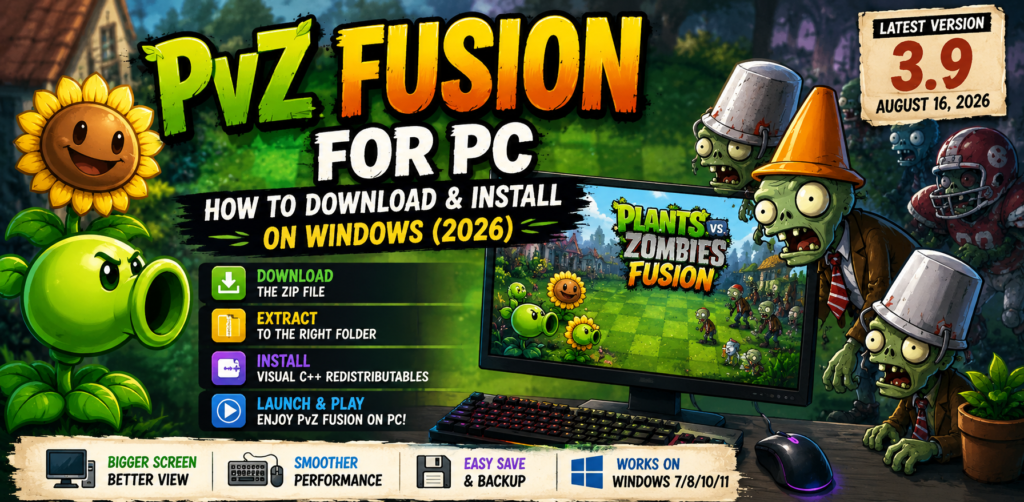
This is the cleanest install path. No emulator required, no Android APK needed. The PC build is a standalone Windows application.
Step 1: Download the ZIP File
PvZ Fusion for PC comes as a ZIP archive, approximately 400 to 520 MB in size depending on the version. The latest release is version 3.9, published on August 16, 2026. Make sure you have at least 500 MB free on your drive before starting the download.
Step 2: Extract to the Right Location
This step is where most install problems start. Do not extract the ZIP to your Desktop, your Downloads folder, or any folder that syncs with OneDrive. These locations cause file permission errors and OneDrive sync conflicts that prevent the game from launching.
Create a dedicated folder in a simple path. Something like C:\Games\PvZFusion works well. Right-click the ZIP file, select Extract All, and point it to that folder. Make sure the folder path has no special characters, accented letters, or spaces.
Step 3: Install Visual C++ Redistributables
Inside the extracted folder, look for a folder named _Redist. Open it and install all the Visual C++ Redistributable packages inside. This step fixes the vast majority of DLL missing errors and application crashes that happen on first launch. You only need to do this once.
Step 4: Launch the Game
Inside the extracted folder, look for a file called Launch Game.bat. Double-click it to start PvZ Fusion. On some systems, especially Windows 11, you may see a Windows Defender SmartScreen warning. This is expected because the game is a custom executable that hasn’t gone through Microsoft’s signing process. Click More Info, then Run Anyway to proceed.
If the game launches in Chinese, that is the default language for the base release. The English translation patch is available from the community’s GitHub page (search PVZF-Translation on GitHub). Extract the patch into your game folder and select English from the in-game settings.
Method 2: Android Emulator
If you specifically want the Android APK version running on PC, an emulator is the route. This adds a layer of complexity and uses more RAM, but it is a valid option if you prefer the mobile build.
BlueStacks is the most widely used emulator for this and works well on higher-end PCs with 8 GB RAM or more. LDPlayer and Nox Player are lighter alternatives that perform better on systems with 4 GB RAM.
The setup process is: download and install the emulator from its official website, sign in with a Google account inside the emulator, then download the PvZ Fusion 3.9 APK from a verified source and drag-and-drop it into the emulator window to install. Allow installation from unknown sources when prompted inside the emulator settings.
The direct PC build in Method 1 is generally the better experience. The emulator route is worth considering only if you want to use the exact same save file across Android and PC, or if you specifically prefer how the mobile controls feel.
Common Errors and How to Fix Them
Game Won’t Launch / Application Error on Startup
Almost always caused by missing Visual C++ Redistributables or an outdated DirectX version. Install the packages from the _Redist folder first. If that doesn’t fix it, download and install DirectX End-User Runtime from Microsoft’s official site. Right-click PvZFusion.exe and select Run as Administrator if problems continue.
DLL Missing Error
Same root cause as above. Missing DLL files almost always point to an outdated DirectX installation or missing Visual C++ libraries. Installing both usually resolves it completely.
Antivirus Quarantines the Game File
Custom game executables from fan-made projects often trigger antivirus heuristic detection. This does not automatically mean the file is dangerous. It means your antivirus doesn’t recognize the publisher. If you downloaded from a verified source, you can add the game folder to your antivirus exclusion list. If you have any doubt about the source, scan the ZIP file on VirusTotal before extracting.
Game Launches in Chinese
This is not a bug. The base build is in Chinese by default. Install the English translation patch from the PVZF-Translation community project on GitHub. Extract it into the root game folder and switch the language in the in-game settings menu.
Performance Issues or Frame Drops
Close background applications before launching. Browser tabs, Discord, and video streaming all consume RAM that the game can use. If you are on a laptop, plug into power while playing since battery saver mode throttles the CPU and causes noticeable slowdown. For older PCs that still drop frames, try running at 1280×720 resolution and lowering shadow and effects settings in the in-game options.
Game Crashes After Update
Back up your save folder before every update. When you overwrite game files with a new version, save compatibility issues occasionally occur. The save data is typically stored in a folder inside the game directory. Copy it to another location before updating, and restore it if the new version doesn’t carry your progress over correctly.
PC vs Mobile – What’s Actually Different
Players who come from Android sometimes wonder if the PC version is missing anything. Here is the honest comparison.
The PC version has all the same content as the Android version for the same release number. All six fusion types are present, all game modes are available, and version 3.9 content including Krakerbiller, Ultimate Firnace, the 14 new Common Fusions, and the two new boss zombies are all included.
What differs is control feel and performance. Keyboard and mouse on PC provide faster plant placement and more precise targeting. The screen size advantage makes multi-lane management significantly easier. Performance on PC is consistently better, especially on higher wave counts in Survival Mode where the game tracks many simultaneous fusion effects.
The Android version has one practical edge: portability. If you play in short sessions on the go, the phone version makes more sense. For longer sessions at home, PC is the better experience by a clear margin.
Where to Get PvZ Fusion for PC
The game is completely free. No purchase, no subscription, no in-app payments. Version 3.9 is the current release as of August 2026 and includes all the latest content from the most recent update.
If you are ready to download Plants VS Zombies Fusion for Windows, use a verified source and follow the Method 1 steps above for the cleanest install. Verify you have the _Redist folder in your extracted files. If it’s missing, the download is likely incomplete or from an incomplete mirror.
The PvZ Fusion Discord server is the best place to get help with install issues that aren’t covered here. The community is active, and version-specific troubleshooting threads are usually searchable by the error message you’re seeing.
Frequently Asked Questions
Is PvZ Fusion for PC free?
Yes, completely free. There are no paid tiers, no in-app purchases, and no subscription. The full game including all game modes and version 3.9 content is available at no cost.
Does PvZ Fusion PC work on Windows 7?
Yes, but you need to install DirectX 9.0c manually from Microsoft’s download page and also install the Visual C++ Redistributables from the _Redist folder. Expect slightly lower performance compared to Windows 10 or 11.
Do I need to install the original Plants vs. Zombies first?
No. The PC version of PvZ Fusion is a standalone build. You extract the ZIP and run it directly. The original PopCap game is not required.
Why does the game open in Chinese?
The base release from the developer is in Chinese. Download the English translation patch from the PVZF-Translation project on GitHub, extract it into your game folder, and select English in the in-game settings.
Why is my antivirus flagging PvZ Fusion?
Fan-made game executables frequently trigger heuristic antivirus detection because they are not signed by a recognized publisher. If you downloaded from a trusted source, this is typically a false positive. Scan the file on VirusTotal before extracting if you are uncertain about the source.
Can I transfer my save from Android to PC?
Save transfer between Android and PC is not officially supported. Some community members have found ways to copy save files between platforms, but results vary depending on version and device. Check the PvZ Fusion Discord for the latest community methods if this matters to you.
Will version 3.9 content work on an older PC?
Version 3.9 is playable on older PCs that meet the minimum requirements. If your PC runs Windows 7 with 2 GB RAM and DirectX 9.0c, the game will run, though you may see some performance dips during heavy fusion sequences. Lowering the resolution to 1280×720 and reducing effects settings helps significantly on lower-end hardware.
Conclusion
The PC version of PvZ Fusion is the most complete way to experience the game. You get the full content library, the best performance, keyboard and mouse precision, and a screen size that makes the game’s strategy layer significantly more readable. The install process is straightforward once you know the two steps that matter most: extract to a clean folder path, and install the Visual C++ Redistributables before launching.
Version 3.9 is the current release, and it is the deepest version the game has ever been. Over 530 fusion combinations, six fusion types, multiple game modes, and new boss zombies make it worth setting up properly on a larger screen.
Follow Method 1, apply the English patch, back up your saves before updates, and you’ll have a stable install that runs cleanly without ongoing maintenance.